
UZURV Drive
UZURVMaps & Navigation
4.7258.00 Reviews
- Version
- 2.23.3
- Installs
- 100.00K
- Age Rating
- Everyone
Screenshots

Our Review of UZURV Drive
 Analysis by Appyee
I approached UZURV Drive as a working driver would: not as a novelty app to open once, but as a tool that has to justify its place on a phone after the first week. Its basic idea is easy to understand. This free Maps & Navigation app, developed by UZURV, is built for people who want to drive and earn while helping with transportation. That combination gives it a more practical purpose than a standard map, but it also means the real test is consistency. An app can feel useful during an enthusiastic first few days and still become unnecessary once the routine becomes repetitive.
My first impression was that UZURV Drive is aimed at a specific kind of user rather than every person who needs directions. If you are looking for turn-by-turn navigation for a holiday, a general map of nearby businesses, or a simple way to compare routes, a conventional navigation service will probably feel more natural. This app makes more sense when driving itself is part of your regular activity and you want that activity connected to a service-oriented earning opportunity.
The public response is encouraging: it holds a 4.7 average from around 1.6 thousand ratings, with more than 100 thousand installs. Those figures suggest that the app has found a real audience, although they should not replace your own judgment about whether its driver-focused purpose matches your schedule. I would treat the rating as a sign of a healthy user experience, not as proof that every driver will find the same value.
What the first week feels like
The first week is where UZURV Drive has its strongest appeal. The concept is immediately more motivating than opening a map for directions alone. Instead of thinking only about getting from one place to another, I can view driving as an activity with a practical contribution attached to it. That change in framing matters, especially for someone who already spends time on the road and wants a more purposeful routine.
I would begin by deciding exactly when the app belongs in my day. Opening it before every short personal trip would create unnecessary noise. A better approach is to use it during the periods when I am genuinely available to drive, keeping personal errands separate from work time. This simple boundary is one of the most useful habits to establish early because it prevents the app from turning every journey into a decision about whether I should be earning.
The first few sessions are also the right time to learn the app’s rhythm without assuming that every opportunity will fit your plans. A driver may be comfortable accepting work in familiar areas but less confident when the route stretches into places with heavy traffic or limited parking. I would pay attention to those personal limits rather than chasing every possible trip. The value of a driver platform is not just how often it can be used; it is how well it fits the hours, roads, and energy I can actually offer.
One realistic scenario is a driver who has a predictable free window after a morning appointment. UZURV Drive may make sense during that window if the driver is already prepared to work, understands the local roads, and can finish without compromising the rest of the day. The same app may be a poor choice for someone who has only ten spare minutes between commitments. In that situation, the setup and attention required can outweigh the benefit of squeezing in a very short session.
That is an important distinction from ordinary navigation apps. Google Maps, Apple Maps, and similar tools are designed to help almost anyone reach a destination. UZURV Drive is more specialized: its usefulness depends on your willingness to participate as a driver, not merely your need for a route. I like that focus, but it means the app should be judged as part of a driving routine rather than as a replacement for a general-purpose map.
The app is free, which lowers the barrier to trying it. I still would not interpret “free” as “cost-free” in practical terms. Driving involves time, fuel, vehicle wear, concentration, and the opportunity cost of choosing one trip over another. The application can support a driving plan, but it cannot make an unprofitable or inconvenient outing worthwhile by itself. My advice during the first week is to record how the experience fits your actual day, not just how attractive the idea feels when you first install it.
Another early habit is to keep the phone interaction disciplined. A navigation-oriented driver app should be prepared before moving, not handled while driving. I would set the route, check the next decision point when safely stopped, and use the phone as a support tool rather than a constant source of distraction. This sounds obvious, but it is especially important when the app combines work information with navigation, because the temptation to inspect details can be stronger than it is with a simple route.
Who gets the quickest benefit
UZURV Drive is most promising for drivers who already have reliable access to a vehicle, can plan their availability, and prefer a focused service over a broad marketplace of unrelated features. It may also suit people who find meaning in transportation that helps others, rather than viewing every drive as a purely commercial transaction. That purpose can make routine work feel more worthwhile, but it will not remove the ordinary demands of driving.
I would be more cautious if you dislike structured routines, need complete flexibility from one minute to the next, or expect an app to provide a steady result without careful planning. The first-week excitement can hide those mismatches. Before committing, ask whether you are willing to maintain a schedule, monitor the practical cost of driving, and accept that some days will be less convenient than others.
Why the month-to-month value depends on habit
After the novelty fades, the central question becomes whether UZURV Drive helps me make better use of recurring driving time. Its long-term value is not likely to come from repeatedly discovering a new interface. It comes from turning the app into a predictable part of a routine: checking availability at the right time, preparing for the type of work I am willing to do, and reviewing whether the effort still makes sense.
I would create a simple weekly review rather than judging the app after one unusually good or bad day. The review could consider how often I used it, whether the sessions fit my plans, and whether the driving left me with enough time and energy for everything else. This is a more honest measure than counting app opens. A tool that is opened frequently but causes rushed decisions is not creating lasting value.
A useful, less obvious trade-off is the difference between gross activity and useful activity. More time on the road does not automatically mean a better outcome. A session that sends me far from my preferred area may create a difficult return journey, while a shorter session near familiar roads may be easier to repeat. UZURV Drive can be part of that decision-making process, but I still need to think beyond the immediate trip and consider where the drive leaves me afterward.
This is where the app differs from a standard map most clearly. A map helps me optimize a route from point A to point B. A driver-focused service asks me to optimize a block of time, my availability, and the practical shape of the work around that route. That broader decision is more demanding, but it can also be more useful for someone who drives regularly. I would keep a general navigation app available as a companion rather than expecting UZURV Drive to answer every mapping question.
The app’s store summary presents the idea of driving and earning while doing good, and I think that message is most convincing when it matches the driver’s personal reason for participating. If I care about providing dependable transportation and can build that into my week, the purpose may help sustain the habit. If I am interested only in maximizing income with no interest in the service side, another driving platform may feel more aligned with my priorities.
There is also a psychological benefit to separating planned work from impulsive work. I would choose specific windows in advance and decide what would make me stop. For example, I might end a session when it conflicts with a personal commitment, when fatigue affects concentration, or when the driving no longer fits the day. These boundaries protect the app from taking over the schedule. They also make it easier to judge the product fairly because I am testing a deliberate routine rather than reacting to every prompt.
The age rating is Everyone, which makes the app broadly approachable from a content perspective. That does not mean every person should use it as a driver. The practical suitability depends on being able to drive responsibly and meet whatever real-world requirements apply to the work. I would focus less on the simple age label and more on whether the driver is prepared for the responsibility, attention, and vehicle demands involved.
The maintenance it asks from a regular driver
Maintenance is not only about updating an app. It is also about maintaining a workable driving system around it. I would keep the phone charged, prepare a safe mounting position, and avoid starting a session when I am already tired or rushed. These are small details, but they determine whether the app feels like a dependable tool or another source of friction.
The current version is 2.23.3, and the listed minimum operating system is 10. That gives the app a clear technical baseline for deciding whether an older device is suitable. I would check compatibility before planning to rely on it, especially if the phone is no longer receiving regular system support. A driver app should not become the reason to use an unreliable handset on the road.
My maintenance routine would also include reviewing the app after updates rather than assuming that every change will feel identical. I would confirm that notifications, location behavior, and navigation handoffs still work as expected before beginning a busy driving period. This is not a criticism of UZURV Drive specifically; it is sensible preparation for any app that becomes part of a moving vehicle and a time-sensitive schedule.
One practical tip is to separate phone troubleshooting from driving time. If something looks wrong, I would pull over safely and resolve it there, rather than trying to diagnose the problem while moving. I would also keep a backup plan for basic directions, such as knowing the area or having a conventional map app ready for route guidance. The specialized app may be central to the work, but it should not be the only thing standing between me and a safe arrival.
Where fatigue begins
The biggest long-term risk is repetition. A driver may enjoy the first week because every screen, route, and decision feels new. Later, the same checks can feel like administrative work, especially when the day is already full. UZURV Drive earns lasting space only if its routine becomes easier than the alternative of organizing the same driving time manually.
There is also mental fatigue from switching between purposes. A driver might use one app for work activity, another for navigation, and the phone itself for communication. Even if each tool is reasonable alone, the combined attention can become tiring. I would reduce that burden by preparing before departure, keeping the route visible, and avoiding unnecessary app switching. The fewer decisions I make while moving, the more sustainable the routine becomes.
Another source of fatigue is uncertainty about whether a session was worth the effort. If I finish a drive without a clear sense of what I achieved, I may gradually stop opening the app. That is why a short weekly review matters. It gives the routine a memory and helps identify patterns, such as certain days being easier, certain areas being more stressful, or certain time windows not fitting personal commitments.
Drivers should also be honest about physical and emotional limits. A service-oriented driving app cannot compensate for tiredness, frustration, or a vehicle that needs attention. If the work begins to make me hurry, skip breaks, or accept trips that do not fit my condition, the correct response is to reduce use or stop for the day. The most valuable feature is not a faster session; it is a routine I can repeat safely.
For some users, the app may become less attractive if they want a broad set of transportation options in one place. A conventional map can show walking, cycling, public transit, and driving choices, while UZURV Drive is centered on the driver’s role. Someone comparing many ways to get around town may prefer the broader tool. Someone focused on driving as a recurring service may appreciate the narrower purpose.
I would also skip it if my main goal is casual navigation with no interest in earning through driving. Installing a specialized driver app for occasional directions would add complexity without addressing the real need. In that case, Apple Maps, Google Maps, or another familiar navigation service would be the better choice. UZURV Drive becomes compelling only when its driver-centered purpose is relevant to the way I actually spend time on the road.
Does it deserve a permanent place on the phone?
My long-term verdict is positive but conditional. UZURV Drive is not an app I would recommend to everyone who owns a car, and I would not treat its high average rating as a substitute for checking whether its purpose fits my schedule. For the right driver, though, it offers a clearer reason to return than a generic map: it connects driving with an opportunity to earn while providing useful transportation.
The lasting value comes from discipline. I would use it during planned availability, prepare the phone before moving, keep a general navigation alternative for route questions, and review the real cost of each driving session. I would also protect time for rest and personal responsibilities. Those habits make the app more sustainable because they stop it from becoming an always-on obligation.
UZURV Drive feels strongest for a driver who wants focused work, values the service aspect, and can build recurring sessions into a realistic week. It feels weaker for a person seeking spontaneous income with no planning, a universal navigation replacement, or a completely frictionless experience. That distinction is not a flaw; it is the consequence of choosing a specialized tool instead of a general-purpose map.
Released on July 3, 2018, the app has had time to establish a recognizable place in its category, and its current version shows that it remains maintained as a working product. I would still judge it by my own routine rather than by its age or popularity. A driver app earns permanent space when I can open it month after month without feeling that the process costs more attention than the work is worth.
For me, that is the fairest way to view UZURV Drive. Try it during a clearly defined driving window, compare the experience with the navigation and work tools you already use, and notice whether it makes your routine more organized or merely busier. If it helps you drive with purpose and maintain a repeatable schedule, it is worth keeping. If it adds another layer of checking without fitting your real life, removing it is the sensible choice.
Verdict
Strengths of UZURV Drive
- Simple interface makes trip details easy to review while driving.
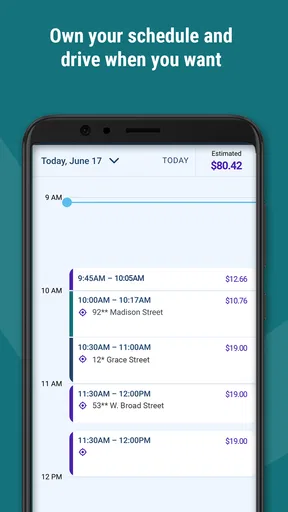
- Useful for drivers who want flexible work opportunities and schedules.
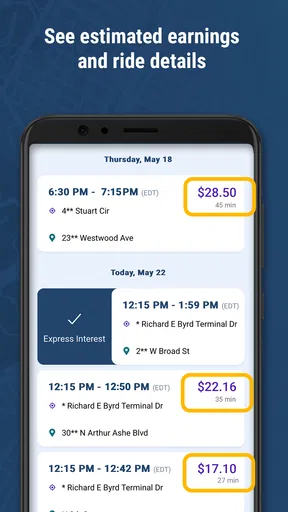
- Trip information can help you plan pickups and drop-offs efficiently.
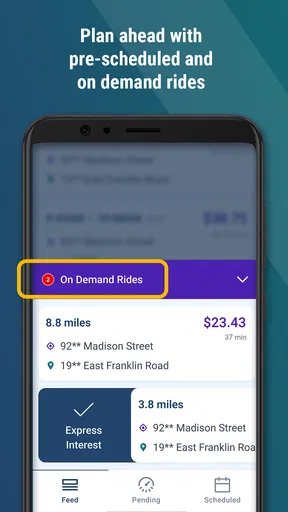
- Designed around assisted transportation and scheduled ride services.
- Available on mobile, making driver tasks accessible away from a computer.
Limitations of UZURV Drive
- Availability and trip volume may vary significantly by service area.
- Requires reliable GPS and mobile data for navigation and trip updates.
- Earnings depend on assigned rides, local demand, and platform policies.
- May require additional driver and vehicle eligibility documentation.
- Background location access can affect battery life and privacy preferences.
Similar Picks in This Category
View All
Uber - Request a ride
Uber Technologies, Inc.4.7


inDrive. Rides with fair fares
® SUOL INNOVATIONS LTD4.8

Yandex Go: Taxi Food Delivery
Mikromobilnost LLC Belgrade4.8

Bolt: Request a Ride
Bolt Technology4.8

Rapido: Bike-Taxi, Auto & Cabs
Rapido Bike Taxi4.8
Frequently Asked Questions
What is UZURV Drive and who is it designed for?
UZURV Drive is a driver-focused platform designed for people who provide prearranged transportation services through the UZURV network. It can help drivers view assigned trips, review passenger and pickup details, manage schedules, and receive updates while working. It is not simply a general ride-hailing app, so availability and features may depend on your location, transportation provider, and approval to drive with UZURV.
How do I sign up and start using UZURV Drive?
To use UZURV Drive, you generally need to be affiliated with UZURV as an approved driver or transportation provider. The registration process may require identity information, driving credentials, vehicle details, insurance documentation, and background or compliance checks. After your account is activated, you can sign in through the app and access trips or assignments made available to you. Requirements can vary by market.
What can drivers do inside the UZURV Drive app?
The app is intended to support the practical tasks involved in completing scheduled rides. Depending on your account and region, you may be able to see upcoming assignments, check passenger and destination information, receive trip notifications, update ride status, and use navigation or communication tools. The exact interface may differ between providers, and some actions may require an active internet connection or permission from your organization.
Does UZURV Drive work with navigation and phone features?
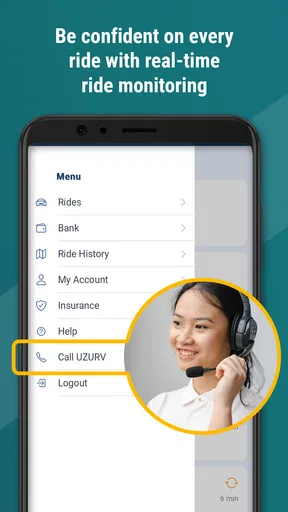
UZURV Drive may work alongside navigation and communication features on your smartphone, making it easier to travel to pickup locations and stay informed during an assignment. You should review the permissions requested during setup, particularly location, notifications, and phone access. Navigation accuracy depends on your device, GPS signal, and mapping service. Drivers should always configure routes before moving and follow local hands-free and road-safety laws.
Is UZURV Drive free to download, and what should I check before installing it?
The application may be available to download without an upfront charge, but access to its driver functions is normally tied to an approved UZURV account or participating transportation provider. Before installing, check that your Android or iPhone meets the supported requirements, that sufficient storage is available, and that your organization uses the app. Also review the latest privacy policy, permissions, and store listing because features and requirements can change.
